Compiling Circuits for EeroQ via Qiskit


Below is a brief tutorial on Superstaq compilation for EeroQ Quantum Hardware whose quantum computer uses electrons bound to superfluid helium. For more information on EeroQ, visit their website here.
Imports and API Token
This example tutorial notebook uses qiskit-superstaq, our Superstaq client for Qiskit; you can try it out by running pip install qiskit-superstaq:
[ ]:
from __future__ import annotations
[1]:
# Required imports
try:
    import qiskit
    import qiskit_superstaq as qss
except ImportError:
    print("Installing qiskit-superstaq...")
    %pip install --quiet 'qiskit-superstaq[examples]'
    print("Installed qiskit-superstaq.")
    print("You may need to restart the kernel to import newly installed packages.")
    import qiskit
    import qiskit_superstaq as qss

import qiskit.circuit.random
To interface Superstaq via Qiskit, we must first instantiate a provider in qiskit-superstaq with SuperstaqProvider(). We then supply a Superstaq API token (or key) by either providing the API token as an argument of qss.SuperstaqProvider() or by setting it as an environment variable (see more details here)
[2]:
# Instantiate a qiskit superstaq provider
provider = qss.SuperstaqProvider()
EeroQ Gates
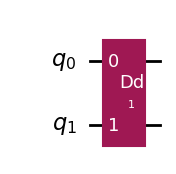
One of the native gates that EeroQ devices operate is the Dipole-Dipole (DD) gate, which couples two electrons. This gate can be applied to electrons within a qubit to perform rotation gates, or across qubits to perform entangling gates. The DD gate is available as a custom gate in qiskit-superstaq.
[3]:
dd_gate = qss.DDGate(1)
[ ]:
# Define a simple circuit with a DD gate
qc = qiskit.QuantumCircuit(2)
qc.append(dd_gate, [0, 1])
qc.draw("mpl")
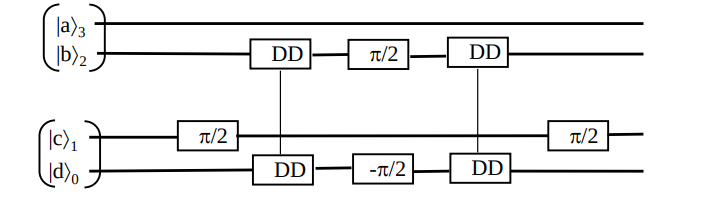
Below is the EeroQ protocol for a CZ Gate.
Single Circuit Compilation
With that gateset, we can compile to the EeroQ Wonderlake device by instantiating an EeroQ backend. We can then call the compile method on that backend.
We can compile to the EeroQ Wonderlake device by instantiating an EeroQ backend. We can then call the backend.compile method.
[5]:
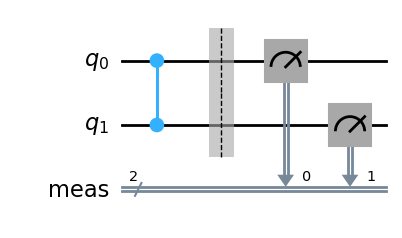
# Create a two-qubit qiskit circuit
qc = qiskit.QuantumCircuit(2)
qc.cz(0, 1)
qc.measure_all()

# Draw circuit for visualization
qc.draw("mpl")
[5]:
[6]:
# Create the backend to compile for
backend = provider.get_backend("eeroq_wonderlake_qpu")
[7]:
# Compile circuit and retrieve by calling `.circuit`
compiled_circuit = backend.compile(qc).circuit
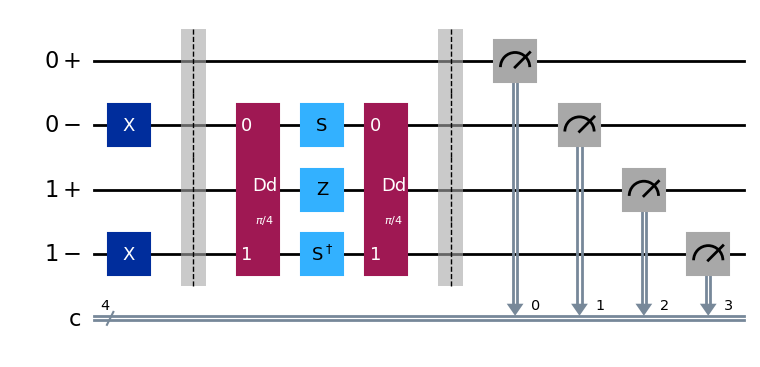
Below we define some helper functions to remove any inactive qubits in the compiled circuit:
[ ]:
def count_gates(qc: qiskit.QuantumCircuit) -> dict[object, int]:
    gate_count = {qubit: 0 for qubit in qc.qubits}
    for gate in qc.data:
        for qubit in gate.qubits:
            gate_count[qubit] += 1
    return gate_count


def remove_idle_wires(qc: qiskit.QuantumCircuit) -> qiskit.QuantumCircuit:
    qc_out = qc.copy()
    gate_count = count_gates(qc_out)
    for qubit, count in gate_count.items():
        if count == 0:
            qc_out.qubits.remove(qubit)
    return qc_out
[9]:
# Visualize the compiled circuit
remove_idle_wires(compiled_circuit).draw("mpl")
[9]:
Multiple Circuit Compilation
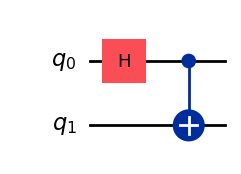
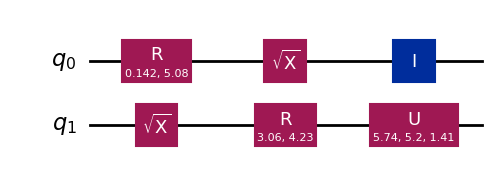
We can repeat the above experiment with larger circuits to see how they compile. Instead of compiling a single circuit at a time, we can also compile a list of circuits in one-go. To illustrate this, let us create two circuits: a Bell circuit, and another randomly generated qiskit circuit:
[10]:
bell_qc = qiskit.QuantumCircuit(2)
bell_qc.h(0)
bell_qc.cx(0, 1)
bell_qc.draw("mpl")
[10]:
[11]:
rand_qc = qiskit.circuit.random.random_circuit(2, 3, measure=False)
rand_qc.draw("mpl")
[11]:
[12]:
# Pass in a list of circuits to `compile`
compiled_outputs = backend.compile([bell_qc, rand_qc])

# To get the list of compiled circuits from the compiled outputs list, call `circuits` instead of just `circuit` which was called for the single circuit input
compiled_circuits = compiled_outputs.circuits
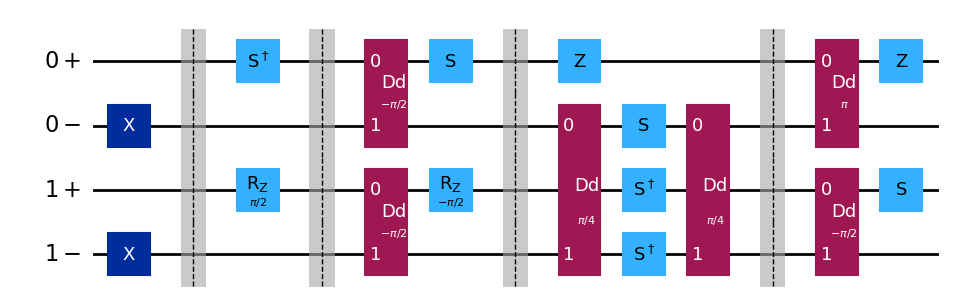
Here’s the compiled Bell circuit,
[13]:
remove_idle_wires(compiled_circuits[0]).draw("mpl")
[13]:
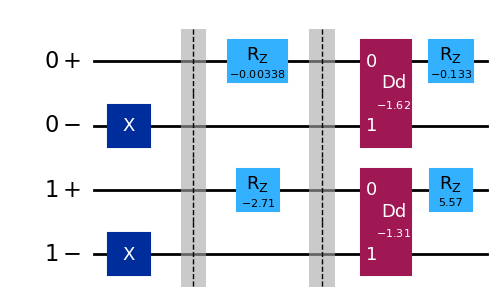
And the compiled random circuit, fully expressed in the native gateset of EeroQ:
[14]:
remove_idle_wires(compiled_circuits[1]).draw("mpl", fold=-1)
[14]:
Using the Superstaq Simulator
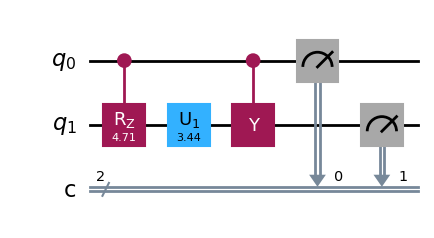
Lastly, we will go over how to simulate a circuit to the EeroQ Wonderlake QPU. This feature is available to free trial users, and can be done by passing the "dry-run" method parameter when calling backend.run() to instruct Superstaq to ideally sample the circuit. Let us generate a random circuit again to demonstrate:
[15]:
# Example random circuit including measurements
qc = qiskit.circuit.random.random_circuit(2, 3, measure=True)
qc.draw("mpl")
[15]:
[ ]:
# Specify "dry-run" as the method to run an ideal Superstaq execution
job = backend.run(qc, shots=1000, method="dry-run")

# Get the counts from the measurement
print(job.result(0).get_counts())
{'00': 1000}
We can additionally perform a noisy simulation of the circuit by setting the method argument to "noise-sim" and specifying an error rate.
[17]:
noisy_job = backend.run(qc, shots=1000, method="noise-sim", error_rate=0.01)
[18]:
print(noisy_job.result(0).get_counts())
{'00': 892, '12': 16, '10': 21, '20': 31, '22': 6, '02': 9}
With the effect of noise, we no longer just measure \(\ket{00}\) like in the dry-run simulation. Note that a measurement value of 2 refers to an out-of-codespace error.